# HelloPack CLI commands

> Manage your licence, plugins and themes from the command line with WP-CLI.

## What is WP-CLI?

WP-CLI is the command-line interface for WordPress. Whatever you would normally do in the admin area, you can do from the command line: install, update, configure and maintain your site. It runs on Windows, macOS and Linux.

## HelloPack CLI commands

The plugin adds three groups of commands:

<div class="cats">
  <div class="cat"><b>Licence</b><code>wp hellopack license</code></div>
  <div class="cat"><b>Plugins</b><code>wp hellopack plugin</code></div>
  <div class="cat"><b>Themes</b><code>wp hellopack theme</code></div>
</div>

## First: is the package manager working?

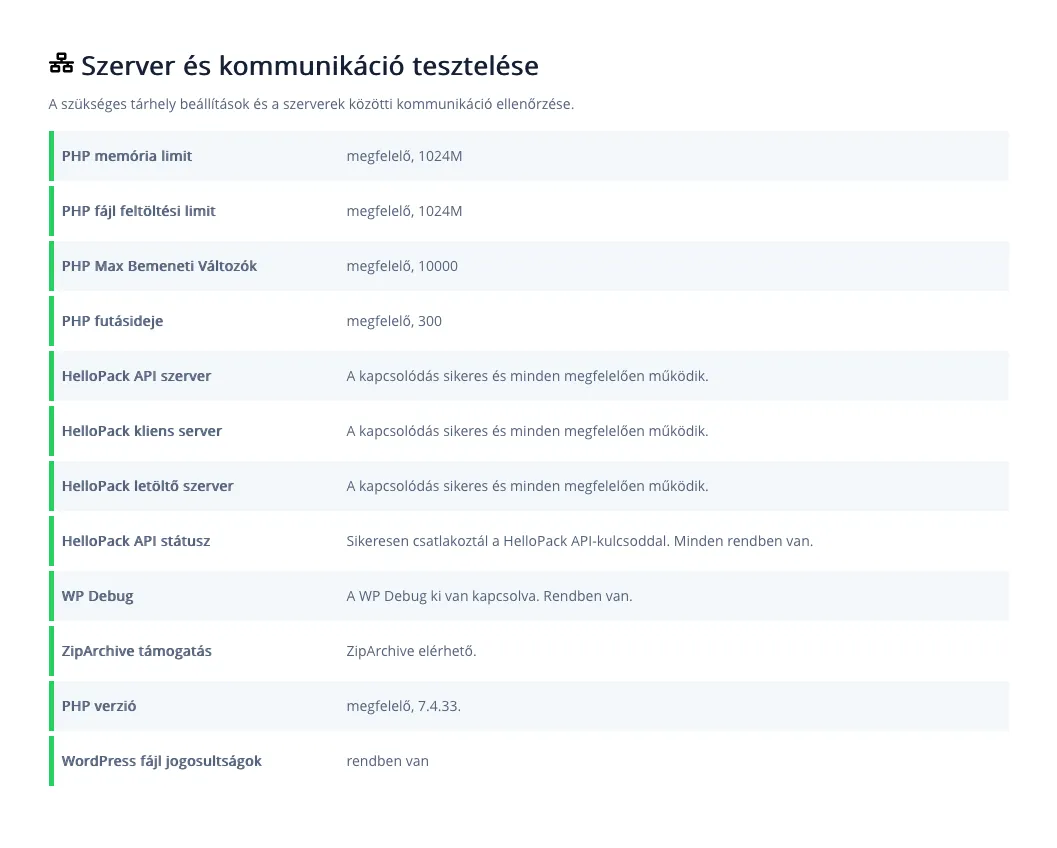
Before running commands, run the built-in tester. In the dashboard's left sidebar click **HelloPack**, then **Help** in the top-right corner. If everything is fine, you will see this:
![HelloPack tester](https://hub.hellowp.io/_astro/hellopack-tesztelo.CLGfRIYx_ZcK89c.webp)

*If this row says you connected successfully with your HelloPack API key, the licence is active and the commands will work.* (https://peldaweboldal.hu)

## Managing your licence

### Activate a licence

Activates your HelloPack licence with the given key.

<ul class="params">
  <li><code>&lt;license-key&gt;</code><span>Your HelloPack licence key.</span></li>
</ul>

```bash
wp hellopack license activate <license-key>
```

The licence key is your HelloPack API key. Create it in the HelloWP Console: in the left menu, under **HelloPack**, open the **API key generator**:

![HelloWP Console dashboard](https://hub.hellowp.io/_astro/api-kulcskeszito-megnyitas.Btm4QJ8L_2kp8AS.webp)

*The HelloWP Console dashboard. The arrow points to the API key generator.* (https://hellowp.io/hu/helloconsole/)

### Deactivate a licence

Removes the key from your website and from the hellowp.io server.

```bash
wp hellopack license deactivate
```

### Licence status

```bash
wp hellopack license status
```

## Managing plugins

### List available plugins

Lists every plugin you can install with HelloPack. JSON output is available too.

```bash
wp hellopack plugin list
wp hellopack plugin list --format=json
```

### Install a plugin

<ul class="params">
  <li><code>&lt;slug|id&gt;</code><span>The plugin's slug or ID.</span></li>
  <li><code>--activate</code><span>Optional. Activates the plugin after installing it.</span></li>
</ul>

```bash
wp hellopack plugin install elementor-pro
```

> **Install and activate in one step**
>
> It works with the ID too: `wp hellopack plugin install 123 --activate`

### Update a plugin

```bash
wp hellopack plugin update elementor-pro
```

## Managing themes

### List available themes

```bash
wp hellopack theme list
wp hellopack theme list --format=json
```

### Install a theme

```bash
wp hellopack theme install bricks
wp hellopack theme install 123 --activate
```

### Update a theme

```bash
wp hellopack theme update bricks
```

## Set up a new site in one go

The commands above, one after another: licence, plugin, theme, then a check.

```bash title="Terminal"
# 1. Activate the licence
wp hellopack license activate <license-key>

# 2. Install and activate a plugin
wp hellopack plugin install elementor-pro --activate

# 3. Install and activate a theme
wp hellopack theme install bricks --activate

# 4. Check
wp hellopack license status
wp hellopack plugin list --format=json
```

## Help on the command line

Lists every HelloPack command and subcommand.

```bash
wp hellopack --help
wp hellopack license --help
wp hellopack plugin --help
wp hellopack theme --help
```
